Showing posts with label C. Show all posts

Sunday, May 23, 2010

Eclipse IDE - Starting Up

Eclipse SDE (Software Development Environment) is a great foundation for different languages IDEs (Integrated Development Environment). Eclipse functionality can be extended with plug-ins and there are plenty of them available for different purposes. Many of plug-ings are free of charge, some other are under commercial licensing. My personal interests lie in the field of programming with C/C++ and Python and corresponding plug-ins come for free.

Since Eclipse is written in Java, Java Runtime Environment (JRE) should be installed on the computer: get it from www.java.com. Installation of Eclipse is straight forward. It's easier to download the closest pre-configured package and unarchive it wherever you want. In my case it is "Eclipse IDE for C/C++ Developers". Eclipse Galileo Documentation (HTML Help Center) from Documentation page has all instructions for installation and tutorials to get started. For Windows I chose MinGW installation path:
  1. Download and run the MinGW setup program, MinGW-5.1.3.exe.

  2. Select download and install the MinGW base tools and the g++ compiler. You may select the Current or Candidate version of these tools. You may also install any of the other available compilers as well.

    Do not install the MinGW Make feature as the MSYS version of make from step 5 is a more complete implementation of make.


  3. The MinGW setup program currently does not install the gdb debugger. To install the debugger, download the file from the following location: gdb-6.6.tar.bz2

  4. Extract the contents of the file gdb-6.6.tar.bz2 to the same location where you installed MinGW.

  5. If you want to use Makefile projects, download and run the setup program from the following location: MSYS-1.0.10.exe. MSYS provides an implementation of Make and related command line tools. This is not required for other types of projects with the MinGW toolchain, which use CDT's internal build tools to perform the build.
It's simple to check how it runs by following "Creating a simple application" tutorial from Eclipse Galileo Documentation "C/C++ Development User Guide / Getting Started"
I had to put full path to dbg.exe debugger to make it working:
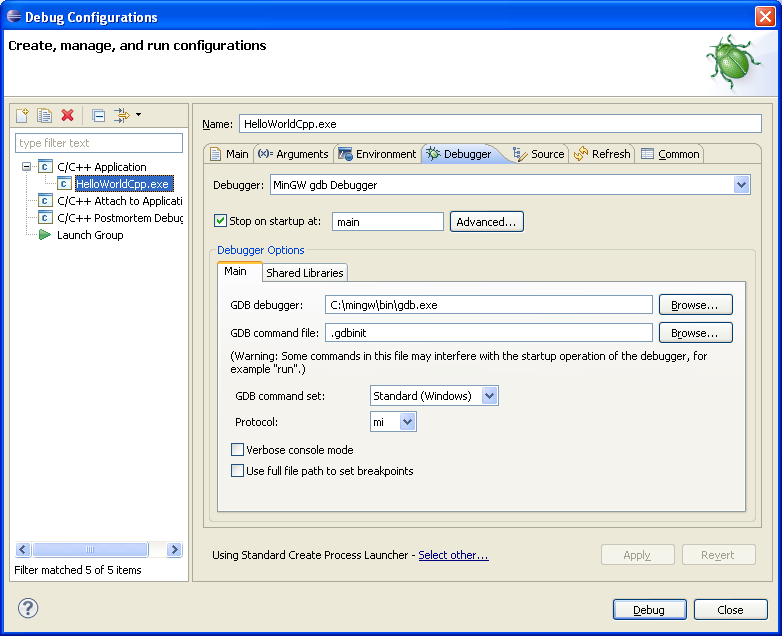

Follow the next "Creating a Makefile project" tutorial to check how Makefile approach works:


Here are some settings to get Makefile and Debug working:


Read more...

Sunday, October 4, 2009

C and C++ Compiling in Linux - Get It Ready

Not all Linux distributions are ready for C and C++ compilation right after installation. Some of them are missing compilers, others - some basic libraries. I decided to write the note how to make it working.

Create a new directory for the tests and save a file HelloWorld.c in it. The file has the following content:

#include <stdio.h>

main ()
{
printf ( "Hello World!\n");
}

On Mepis 7.0 machine cc and gcc C compilers were installed:

$ whereis cc gcc
cc: /usr/bin/cc
gcc: /usr/bin/gcc /usr/lib/gcc

but attempt to compile the C code ended up with an error :

$ cc HelloWorld.c -o HelloWorld_cc
HelloWorld.c:1:19: error: stdio.h: No such file or directory
HelloWorld.c: In function 'main':
HelloWorld.c:5: warning: incompatible implicit declaration
of built-in function 'printf'

The missing "stdio.h" library comes with the "build-essential" package. Mepis has Synaptic package manager - start it and install the package. After that compilation passes through without an error:

$ cc HelloWorld.c -o HelloWorld_cc
$ ./HelloWorld_cc
Hello World!

$ gcc HelloWorld.c -o HelloWorld_gcc
$ ./HelloWorld_gcc
Hello World!

Mepis 8.0 did not have a problem with C program, but neither c++ nor g++ compiler was installed:

$ whereis c++ g++

gave out nothing. With a package manager (again Synaptic in my case) install the compiler(s). After that "whereis" can find them:

$ whereis c++ g++
c++: /usr/bin/c++ /usr/include/c++
g++: /usr/bin/g++

Create HelloWorld.cpp C++ file:

#include <iostream>
using namespace std;

int main ()
{
cout << "Hello World!\n";
return 0;
}

Compilation is successful with the both compilers:

$ g++ HelloWorld.cpp -o HelloWorld_g++
$ ./HelloWorld_g++
Hello World!

$ c++ HelloWorld.cpp -o HelloWorld_c++
$ ./HelloWorld_c++
Hello World!

Read more...